Adobe Express: Effortless AI Design for Stunning Visuals
In today's visually-driven world, creating captivating content is no longer a luxury but a necessity for individuals, small businesses, and large enterprises alike. However, not everyone possesses advanced design software skills or the budget to hire professional designers for every project. This is where Adobe Express steps in as a game-changer, democratizing design with its intuitive interface and powerful AI capabilities. An all-in-one web and mobile application, Adobe Express empowers users to produce professional-grade visual content with remarkable ease and speed, transforming complex design tasks into simple, engaging workflows.
What is Adobe Express and Why Does it Matter?
At its core, Adobe Express is a versatile creative application developed by Adobe Inc., designed to help anyone create a wide array of visual assets. From eye-catching social media graphics and engaging short videos to animated GIFs, professional flyers, distinctive logos, and even one-page websites, the possibilities are vast. Its significance lies in its ability to bridge the gap between sophisticated design tools and everyday users. Whether you're a student needing a compelling presentation, a small business owner crafting marketing materials, an influencer creating daily content, or an enterprise team maintaining brand consistency, Adobe Express offers a solution.
The platform's evolution speaks volumes about its commitment to user experience and innovation. Initially launched as Adobe Spark in 2016, it was rebranded as Creative Cloud Express in 2021, and eventually simplified to Adobe Express. This journey reflects a continuous enhancement of its features, integrating core functionalities from Adobe's flagship products like Photoshop and Premiere Pro, and most notably, the groundbreaking Adobe Firefly generative AI. This strategic integration ensures that users benefit from Adobe's decades of creative innovation, all within a streamlined, accessible environment.
Unleashing Creativity with AI-Powered Features
The true magic of Adobe Express lies in its robust suite of AI-powered tools, making complex design tasks accessible and even enjoyable for non-designers. These features are not just about automation; they're about intelligent assistance that guides users toward creating stunning visuals.
Generative AI Powered by Adobe Firefly
The integration of Adobe Firefly's generative AI is a cornerstone of Adobe Express's appeal. This technology allows users to:
- Generate Images from Text: Simply describe what you envision, and Firefly can create unique images that align with your concept. This is invaluable for quickly populating designs with custom visuals without needing to search through stock libraries.
- Create Text Effects: Transform ordinary text into extraordinary typographic elements with various styles and textures, all from a simple text prompt. Imagine metallic, fuzzy, or even glowing text generated in seconds.
- Design Logos and Elements: Use AI to brainstorm and generate design elements, including initial logo concepts or specific graphic components, to be incorporated into your projects, including the free website builder.
Crucially, Adobe emphasizes that its generative AI is designed to be commercially safe, giving users peace of mind when using AI-generated content for professional or business purposes. This ensures that the creative output is responsible and ready for public use.
Intuitive Tools & Quick Actions for Rapid Creation
Beyond generative AI, Adobe Express provides a wealth of practical tools that streamline the design process:
- Thousands of Customizable Templates: Start with professionally designed templates for virtually any project – social media posts, flyers, resumes, menus, videos, and more. These templates provide a strong foundation that users can easily customize with drag-and-drop editing.
- Quick Actions: Perform common editing tasks with a single click, such as removing backgrounds from images, resizing images for different platforms, converting videos to GIFs for memes and reactions, generating QR codes, editing PDFs, and trimming videos. These actions significantly boost efficiency.
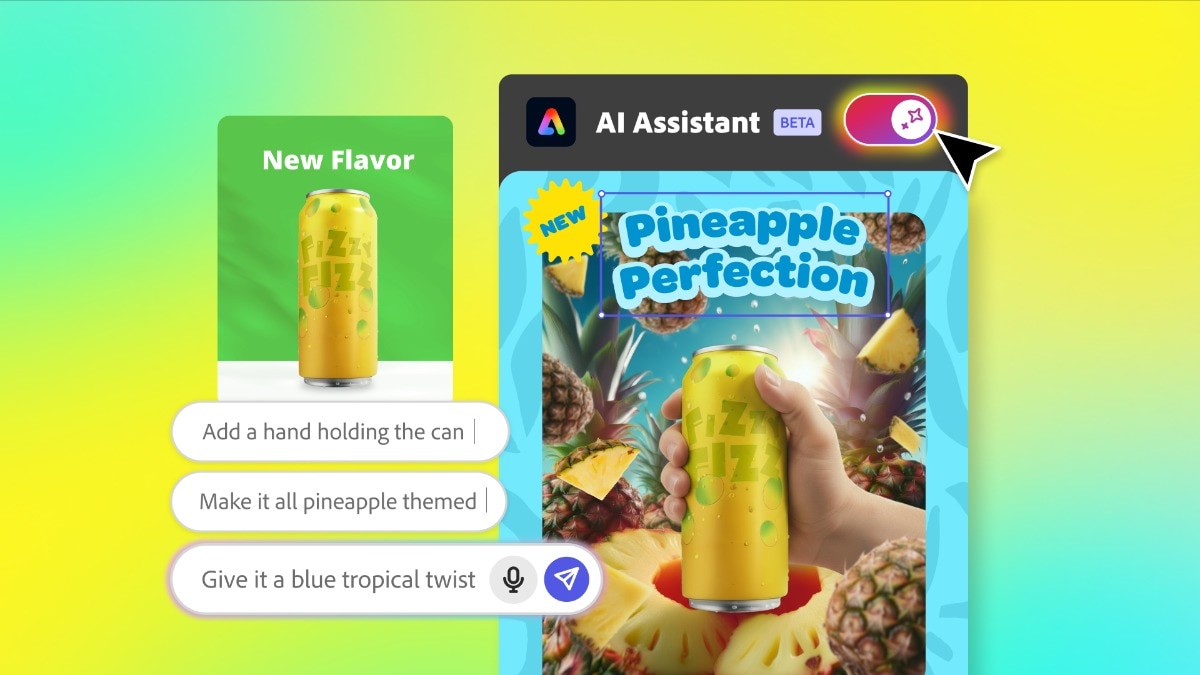
- AI Assistant: This innovative feature allows you to prompt, create, and refine elements within your design. It's like having a design assistant to help make quick edits and fine-tune every layer, ensuring the parts you love remain intact.
Effortless Website Creation
Adobe Express also includes a surprisingly robust, free website builder that enables users to create engaging one-page websites. Leveraging templates, drag-and-drop editing, and Firefly-powered AI for generating images, text effects, and other content, users can quickly launch a professional online presence. It’s a user-guided process, offering creative control while leveraging AI for specific elements rather than fully automating the entire site generation, ensuring a personalized touch. To learn more about how Adobe Express can be your go-to for web projects, check out Adobe Express: Graphics, Video, Websites – Your All-in-One Tool.
Seamless Workflows and Brand Consistency
For individuals and teams alike, maintaining brand consistency and facilitating collaboration are paramount. Adobe Express excels in these areas, offering features that streamline workflows and ensure every piece of content aligns with your brand identity.
Collaboration and Brand Kits
Adobe Express supports real-time collaboration, allowing teams to work together on projects seamlessly. This is especially beneficial for marketing departments or creative teams that need to iterate quickly. Furthermore, the platform's brand kit feature is a lifesaver for maintaining visual identity. Users can upload their logos, define brand colors, and set preferred fonts, ensuring that all created materials automatically adhere to established brand guidelines. This consistency builds trust and reinforces brand recognition across all touchpoints.
Integration with the Adobe Ecosystem
For users already within the Adobe ecosystem, Adobe Express offers seamless integration with Creative Cloud libraries. This means assets, fonts, and graphics from Photoshop, Illustrator, or other Adobe applications can be easily accessed and incorporated into Adobe Express projects, creating a unified creative workflow. This level of integration is particularly valuable for enterprises and larger teams that rely on a comprehensive suite of Adobe tools.
Optimized for Output and Sharing
Once your content is perfected, Adobe Express makes sharing a breeze. It offers optimized export options for various platforms, from Instagram and TikTok to YouTube and beyond, ensuring your visuals look their best wherever they're published. This focus on practical output saves valuable time for social media managers and content creators. For businesses looking to produce rapid, on-brand content, Adobe Express is an invaluable asset. Dive deeper into its business applications with Adobe Express: Rapid On-Brand Content for Businesses & Individuals.
Practical Tips for Maximizing Adobe Express
To truly harness the power of Adobe Express, consider these actionable tips:
- Start with a Template, But Make it Yours: Don't feel pressured to design from scratch. Leverage the vast template library, then customize elements to infuse your unique style and brand voice.
- Experiment with Firefly: Use the generative AI for brainstorming. Need an abstract background or a specific text style? Prompt Firefly to generate options and iterate until you find what you love.
- Build Your Brand Kit Early: Even if you're a solopreneur, setting up your brand kit with preferred fonts and colors will save immense time and ensure consistency across all your designs.
- Utilize Quick Actions for Efficiency: Make background removal, video trimming, and GIF creation part of your regular workflow. These quick wins add up to significant time savings.
- Explore Different Content Types: Don't limit yourself to static images. Experiment with short videos, animated GIFs, and even one-page websites to diversify your content strategy.
Free vs. Premium: Choosing Your Adobe Express Plan
Adobe Express offers flexibility with its pricing structure, catering to different user needs:
- Free Plan: Provides access to basic design tools, a selection of templates, and limited generative AI credits. It’s an excellent way to get started and understand the platform's capabilities without any commitment.
- Premium Plan: Starting at $9.99 per month, this plan unlocks unlimited access to premium templates, Adobe Stock assets, more generative credits, and removes ads, offering an expansive toolkit for serious creators.
- Business and Enterprise Versions: These plans provide additional features like admin controls, enhanced security, and team licensing, making them ideal for larger organizations that require centralized management and brand governance.
The platform's widespread appeal is reflected in its high user ratings, boasting 4.8 stars on the iOS App Store from over 350,000 reviews and 4.6 stars on Google Play from over 650,000 reviews. These numbers underscore its effectiveness and user satisfaction across diverse audiences.
In conclusion, Adobe Express stands out as an indispensable tool for anyone looking to create stunning visual content without the steep learning curve traditionally associated with design software. By expertly blending intuitive drag-and-drop editing with the groundbreaking power of Adobe Firefly's generative AI, it simplifies complex design processes, fosters brand consistency, and enhances collaboration. Whether you're an individual seeking to amplify your personal brand or a large enterprise streamlining your creative workflows, Adobe Express provides an effortless pathway to professional-grade visuals. Try it out today and experience the future of AI-powered design.